
Quick Takeaway
- Workflow automation maturity matters more than the number of automated workflows.
- Governance-first automation creates the metadata, approval, rights, and routing structure that enterprise content operations depend on.
- Ingest, metadata tagging, and workflow routing form the foundation for downstream automation.
- Workflow orchestration connects individual automations into a governed operating model.
- AI readiness depends on structured metadata, machine-readable workflow states, trusted permissions, and standardized rights data.
Digital Asset Workflow Automation: 7 Workflows Worth Automating First
A marketing campaign is ready to launch, but the hero image is stuck in an approval queue. It’s routed to the wrong reviewer, sitting in someone’s inbox, or waiting on a stakeholder who’s out of office. Multiply that by hundreds of assets a month, and manual routing isn’t just an inconvenience. It’s a bottleneck that slows every campaign behind it.
Enterprise DAM teams know digital asset workflow automation can fix this. The harder question is where to start, how to sequence each step, and how to avoid automating broken processes at scale.
Most organizations don’t struggle because they automate too little. They struggle because they automate without a plan. Bolt automation onto disconnected tasks, and it speeds up the same problems that were already there: assets tagged inconsistently, approvals stuck in the wrong queue, and rights information nobody double-checked until it was too late.
A better approach is governance-first automation. This article gives DAM administrators, content operations leaders, and enterprise systems teams a framework for moving from manual workflows to orchestrated, AI-ready content operations.
The seven workflows still matter, but they are not the whole story. They are the building blocks of workflow automation maturity.
Digital asset workflow automation uses rules-based logic, AI-assisted processing, and configured triggers to move assets, metadata, approvals, and distribution tasks through the content lifecycle without manual work at every step. For enterprise DAM programs, it’s a governance decision as much as a technical one. The best workflows to automate first are the repetitive, trigger-based ones that improve metadata quality, ensure approval consistency, and enforce rights controls.
Workflow Automation Definitions for Enterprise DAM Teams
These are the core terms enterprise teams need to align on before building an automation roadmap.
Digital Asset Workflow Automation
Digital asset workflow automation uses rules, triggers, and AI to move assets through intake, metadata enrichment, review, approval, rights management, localization, and distribution with less manual work.
Workflow Orchestration
Automation handles a single task. Orchestration connects that task to everything around it, coordinating steps across teams, systems, and downstream channels so the whole process works together.
Rules-Based Routing
Rules-based routing sends assets to the right team, queue, approver, or destination based on conditions like asset type, brand, region, rights status, or project stage.
Automated Metadata
Automated metadata is structured information applied at ingest or during enrichment, using taxonomy rules, AI suggestions, or system triggers. It makes assets easier to find, track, and reuse.
Content Operations
Content operations is the combination of people, processes, and technology that moves content from creation through distribution, reuse, and arciving.
Enterprise Governance
Enterprise governance is the set of rules, standards, permissions, approvals, and audit trails that ensure content is used correctly and consistently across brands, regions, and teams.
Why Digital Asset Workflow Automation Maturity Matters Before You Automate Anything
Not all automations create the same value. Some remove repetitive work immediately. Others only work reliably after metadata, routing, permissions, and approval states are already structured.
That is why workflow automation should start with maturity, not features.
Enterprise teams should evaluate each automation through four lenses.
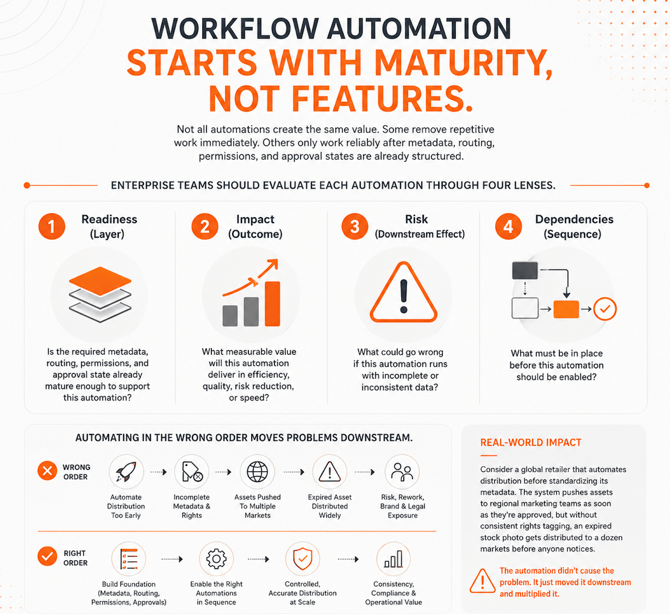
Automating in the wrong order moves problems downstream. Rights expiration monitoring depends on the rights metadata being complete. Distribution automation depends on the approval status being machine-readable. Localization triggers depend on approved master assets being clearly connected to regional variants.
Consider a global retailer that automates distribution before standardizing its metadata. The system pushes assets to regional marketing teams as soon as they’re approved, but without consistent rights tagging, an expired stock photo gets distributed to a dozen markets before anyone notices. The automation didn’t cause the problem. It just moved it downstream and multiplied it.
Sequence determines whether automation strengthens enterprise content operations or simply accelerates inconsistency.
Which DAM Workflows to Keep Manual, and Why It Matters
A mature workflow automation program is clear about what should not be automated.
Creative judgment, brand strategy, executive decisions, legal review, novel rights scenarios, high-stakes compliance exceptions, and final creative direction still require human oversight. These are not automation gaps. They are governance design choices.
The goal is not to remove people from the content lifecycle. The goal is to remove the manual handoffs, reminder emails, routing decisions, status checks, and repetitive administrative tasks that prevent people from focusing on judgment-based work.
Automation should create the structure around human decisions. It should ensure the right people see the right asset at the right time, with the right metadata, rights information, version history, and approval context. Knowing what to keep manual is part of enterprise workflow management maturity.
Rights Governance Maturity Matrix
Enterprise DAM programs typically move through five workflow automation maturity stages: Manual, Assisted, Automated, Orchestrated, and AI-Driven.
|
Maturity Stage |
What It Looks Like |
Governance Risk |
Next Step |
|
Manual |
Teams upload, tag, route, review, and distribute assets by hand. |
High |
Standardize intake, metadata, and approval rules. |
|
Assisted |
The DAM supports templates, alerts, and notifications, but people still initiate most actions. |
Medium to High |
Add rules-based triggers for repeatable handoffs. |
|
Automated |
Ingest, tagging, routing, approvals, and rights checks begin to run through configured logic. |
Medium |
Connect automations into end-to-end workflows. |
|
Orchestrated |
Metadata, approvals, rights, localization, distribution, and integrations operate as one governed content workflow. |
Low to Medium |
Use workflow history and structured metadata to support AI. |
|
AI-Driven |
AI enrichment, recommendations, next-action guidance, and routing assistance operate within governed workflows. |
Lower, when governance is mature |
Continuously monitor metadata quality, rights logic, and approval accuracy. |
Most organizations operate across several of these stages at once, with different asset types, teams, or workflows at different levels of maturity, rather than the whole program fitting neatly into a single row.
The most common mistake is attempting AI-driven capabilities before the automated foundation exists. AI that operates on incomplete metadata, inconsistent approval states, or unstructured rights data does not improve content operations. It accelerates the wrong work.
Governance is what makes automation reliable. Automation is what makes governance scalable. Orchestration is what connects both into an enterprise operating model.
DAM Workflow Prioritization Matrix
The seven workflows below form a maturity path for enterprise digital asset management workflows. The order matters as much as the list.
|
DAM Workflow |
Business Value |
Implementation Effort |
Governance Impact |
AI Readiness |
Recommended Priority |
|
Asset Ingest |
High |
Low |
High |
High |
1 |
|
Metadata Tagging |
High |
Medium |
High |
Very High |
2 |
|
Workflow Routing and Assignment |
High |
Medium |
High |
High |
3 |
|
Review and Approval |
High |
Medium |
High |
Medium |
4 |
|
Rights and Expiration Checks |
High |
Medium |
Very High |
Medium |
5 |
|
Localization Triggers |
Medium |
Medium |
High |
Medium |
6 |
|
Distribution Prep and Delivery |
High |
Medium to High |
High |
High |
7 |
The priority order starts with the workflows that create structure. Ingest brings assets into the governed system. Metadata tagging creates the context layer. Routing turns metadata into action. Review, approval, rights, localization, and distribution become more reliable once those foundations are in place.
The 7 Digital Asset Workflows That Build Automation Maturity
These seven workflows are the highest-value ones to automate first when moving an enterprise DAM from manual, high-friction processes to a mature, governed operating model. Following this sequence helps content operations leaders keep metadata accurate and processes consistent, setting up the enterprise content supply chain to run at scale.
1. Asset Ingest
Asset ingest is the entry point for governed content operations. It’s also one of the highest-frequency, lowest-creativity workflows in enterprise DAM programs.
Marketing teams pull creative directly from Adobe Creative Cloud, agencies submit finished assets in bulk, and product images arrive through PIM integrations, often all in the same week. Automating ingest means every one of those assets lands in the DAM already tagged, routed, and ready for review, instead of sitting in a queue waiting for someone to sort it by hand.
Challenges: Manual Asset Ingest
When ingest is manual, assets arrive through email, shared drives, agency uploads, creative tools, and system integrations without a consistent structure. Files bypass naming standards, required metadata fields, folder rules, and approval pathways. Shadow libraries form before the governed DAM becomes part of the process.
Solutions and Results: Automated Manual Ingest
Assets arriving from configured sources such as Adobe Creative Cloud connections, agency delivery systems, product information systems, or direct upload points route into the correct structure immediately. Ingest applies baseline metadata, enforces required fields, and drops assets into enrichment queues instead of unstructured inboxes.
The payoff shows up downstream. When every asset enters tagged, routed, and rights-aware, teams stop re-sorting inboxes, shadow libraries stop forming, and every later workflow starts from a structured state instead of cleaning up an unstructured one.
2. Metadata Tagging
Metadata quality is one of the clearest indicators of workflow automation maturity. Poor metadata limits search, slows reuse, weakens governance, and reduces AI reliability.
Challenges: Manual Metadata Tagging
Manual tagging is also one of the most repetitive administrative burdens in content operations. The Monotype Scaling Creative Operations report found that 57% of creative teams spend more than a quarter of their time on non-creative tasks, including asset management and compliance work (Monotype, 2025). That’s a quarter of your most expensive creative capacity spent on work automation can absorb.
Solutions and Results: Automated Metadata Tagging
Automated metadata tagging applies structured taxonomy terms, rights fields, project tags, product data, and enrichment suggestions at ingest or on demand. Teams shift from manually tagging every asset to reviewing and confirming suggested metadata. The AI layer of Orange Logic reads each asset as it lands, detecting objects, faces, and scene context and proposing taxonomy-controlled tags a person confirms in seconds, so enrichment keeps pace with ingest instead of falling behind it. When assets are tagged consistently, teams find what already exists instead of recreating it, which cuts duplicate asset requests and redundant production work.
AI-assisted metadata should augment controlled taxonomies and governance rules, not replace them. Orange Logic’s AI suggests tags, detects objects, enriches descriptions, and recommends categories, but the taxonomy still needs an enterprise structure.
The business outcome is reuse and speed. Consistent, machine-readable metadata is what lets teams find and reuse approved content instead of recreating it, and it’s the context layer that routing, approvals, permissions, rights checks, reporting, and AI all run on. Get it right once, and every downstream workflow gets faster and cheaper.
3. Workflow Routing and Assignment
Creative workflows typically require input from multiple stakeholders and review of edits made based on feedback.
Challenges: Manual Metadata Tagging
Manual routing is one of the most common bottlenecks in enterprise content operations. Coordinators assign tasks, forward files, chase status updates, and correct misrouted assets across distributed teams, agencies, brands, and regions.
Solutions and Results: Automated Workflow Routine and Assignment
Rules-based routing replaces that coordination burden with configured workflow logic. Assets move to the right team, queue, approver, or system based on conditions such as asset type, brand, market, project code, rights status, metadata completeness, or workflow stage.
This is where metadata starts driving what happens next instead of just describing what already exists. A rights field determines whether an asset can be distributed to a given market. A project tag determines which approval queue it lands in. A product code determines which regional teams get notified. Metadata isn’t just for search anymore. It’s the input that routing decisions run on.
What changes operationally is significant. Coordinators no longer need to initiate every handoff. Exceptions trigger escalation rules. Assets that lack required metadata are returned for enrichment. Region-specific assets are assigned to the appropriate local team. Restricted assets bypass distribution queues.
That buys speed and consistency at scale. Assets move the moment they’re ready instead of waiting on a coordinator to notice, misrouting and rework drop, and the same process logic fires the same way across every team, brand, and region.
4. Review and Approval
Creative workflows end with approvals, often from multiple stakeholders in a specific order.
Challenges: Manual Review and Approval
Review and approval workflows are where content operations often stall. Reviewers miss notifications. Approvals sit in queues. Reminders go unsent. Escalations depend on someone noticing the delay.
Solutions and Results: Automated Review and Approval
Approval workflow automation creates a more reliable review process. Approvers are notified when work arrives. Reminders trigger before deadlines. Overdue reviews escalate automatically. Parallel approvals allow multiple stakeholders to review at the same time. Conditional approvals route assets differently based on region, asset type, rights status, or content category.
For example, a global product launch asset might require sign-off from Legal, Brand, and Regional Marketing. Instead of routing the asset through each team in sequence, parallel approval sends it to all three at the same time, and the workflow moves forward only once all required approvals are in.
This is especially important for enterprise teams managing regulated, multi-brand, or multi-region content. A review and approval workflow should not be treated as a simple yes-or-no task. It should create an auditable record of who reviewed the asset, when they reviewed it, which version they reviewed, the decision they made, and the asset’s state at that time.
The business outcome is faster approvals with a defensible record. Reviews stop stalling in inboxes, and approval becomes a structured, auditable content state (who reviewed what, when, and which version) that distribution, localization, rights checks, and reuse can all trust.
For teams evaluating review and approval tooling, the FAQ section below covers what to look for.
5. Rights and Expiration Checks
Rights and expiration checks as part of digital rights management are critical for preventing costly violations and rework.
Challenges: Manual Rights and Expiration Checks
Rights violations in content distribution are often process failures. Teams may know an asset has usage restrictions or an expiration date, but manual rights checking depends on someone remembering to verify those details before use.
That dependency fails at enterprise volume.
Solutions and Results: Automated Rights and Expiration Checks
A governed workflow answers the rights questions before an asset ships: Has the license expired? Can this run in this region? Are there talent or partner restrictions? Is this cleared for this channel? Automated rights monitoring tracks license windows, usage restrictions, talent agreements, territory limits, and expiration dates across the asset library. When rights lapse, the system can flag the asset, restrict download access, trigger a renewal notification, move it to a controlled state, or block it from distribution workflows. It can also trigger automatic removal from connected portals, websites, or CMS destinations, so an expired asset doesn’t stay live somewhere just because no one remembered to pull it down.
Where the rules enforce known expiry dates, Orange Logic’s AI works the exceptions they can’t see. It surfaces assets whose rights look risky even when no expiration was ever recorded, like an unreleased talent likeness or a stock image with no license on file, and routes them for review before they reach a distribution queue.
The business outcome is lower compliance risk without the manual overhead. Rights data becomes active workflow logic instead of a field someone may or may not inspect, so expired or restricted assets never reach active channels.
Ravinia, the summer home of the Chicago Symphony Orchestra, captures roughly 8,500 photos and videos across 300+ concerts a year, and rebuilt its archive on Orange Logic specifically because rights weren’t being enforced. Now rights controls travel with every asset in a library of hundreds of thousands of files, so nothing reaches distribution without a cleared license behind it.
6. Localization Triggers
Global enterprise teams frequently recreate content because localization begins too late or starts from the wrong version.
Challenges: Manual Localization Workflow
With manual localization processes, a regional team may adapt a file before the master asset is fully approved. Another team may miss the final version entirely. In many cases, the trigger for localization is simply someone remembering to send the asset.
Solutions and Results: Automated Localization Worflow
Localization triggers create a more governed process. Once a master asset reaches an approved and rights-cleared state, the system can route it to the appropriate regional queue, trigger translation requests, initiate regional asset creation, or assign localization approvals.
A single product launch asset might need to become a dozen regional variants at once, translated into multiple languages, resized for local ad formats, and adapted with region-specific pricing or claims, all without any team waiting on someone else to notice the master is ready.
This improves operational efficiency by ensuring regional teams receive assets on schedule. It also improves metadata quality by allowing localized variants to inherit key fields from the approved master asset. Region, language, market, campaign, product, approval status, and rights relationships remain connected.
Two things improve at once. Regional teams get approved masters on schedule instead of recreating content or adapting the wrong version, and every variant traces back to the approved master, even as content moves across markets, teams, and channels. The result is less duplicated work and cleaner global consistency.
7. Distribution Prep and Delivery
Distribution is often the final manual step in an otherwise structured workflow.
Challenges: Manual Distribution
After an asset is ingested, tagged, routed, reviewed, approved, and rights-cleared, someone still needs to create renditions, resize files, package formats, and push assets to downstream systems. This work takes hours that could be spent on higher value activities.
Solutions and Results: Automated Distribution
Distribution automation closes the content supply chain. Once an asset reaches the correct approved and rights-cleared state, the system can generate renditions, prepare channel-specific formats, publish to a CDN, deliver to a CMS, syndicate to eCommerce platforms, support social distribution, or send assets through API-driven integrations.
A single approved product image, for example, can be published simultaneously to the corporate CMS, the eCommerce catalog, and a network of partner portals, each in the correct format and resolution for its destination, without anyone having to manually export and upload it three times.
This ensures that only approved, correctly formatted, rights-cleared assets reach downstream destinations. It also prevents teams from creating local workarounds at the final stage of the workflow.
The result is faster time-to-channel with governance intact. One approved asset reaches every destination in the right format without manual export-and-upload, and the same metadata, approval, permissions, and rights logic that governed it at intake still applies at delivery.
How Digital Asset Workflow Automation Enables Enterprise AI
Enterprise AI depends on governed content operations. It needs structured metadata, reliable approval states, permissions architecture, standardized rights data, version history, and workflow context.
Without that foundation, AI cannot determine whether an asset is approved, expired, restricted, localized, final, outdated, or eligible for reuse.
According to a 2026 HBR Analytic Services report commissioned by Cloudera, only 7% of enterprises say their data is fully ready for AI, and 73% of enterprise leaders say their organizations should prioritize AI data quality more than they currently do. That gap is the cost of skipping the sequence: the AI investment underperforms not because the models are weak, but because the operating model beneath them can’t tell the model what’s approved, current, or cleared for reuse.
Metadata enrichment, rights-aware recommendations, AI-assisted routing, and next-action guidance all require trusted operational context, and that context is exactly what workflow maturity builds. The issue is rarely AI alone. It’s the operating model around it: when metadata is inconsistent, or workflows don’t reliably capture approval and rights states, AI has nothing solid to reason from, so its recommendations end up unreliable no matter how good the model is.
This is the objection every executive raises: if AI search is this good, why still invest in metadata? Because better AI search raises the bar for metadata. It doesn’t remove it. Embeddings surface what’s relevant, but structured metadata and rights state determine what’s actually usable. AI can surface the on-brand image in seconds and still not know its license expired last month. Governance is what closes that gap.
Orange Logic’s AI works inside governed workflows, not outside them. Its tagging, enrichment, recommendations, and workflow assistance get more reliable because they operate inside a system that already understands metadata, permissions, approvals, and rights.
How Orange Logic Supports Workflow Automation
Orange Logic approaches workflow automation as part of a broader content orchestration approach, connecting metadata, approvals, governance, AI services, search, permissions, and downstream delivery through configurable workflows rather than automating isolated tasks.
The workflows capability supports visual workflow configuration, multi-step routing, multi-approver review, conditional logic, and escalation rules that match real-world enterprise processes. Administrators adjust routing conditions, approval paths, and handoff rules for routine changes without developer dependency.
That matters because content operations change constantly. New regions launch. Brand rules shift. Rights models evolve. Marketing, product, legal, and agency partners need different review paths. Workflow automation should adapt to that without forcing teams back to manual coordination.
Orange Logic’s AI adds AI-powered tagging, enrichment, search, recommendations, and routing assistance within the governed workflow itself, operating inside the metadata, rights, permissions, and approval structure the workflow model establishes, rather than as a disconnected feature layer.
For enterprise teams managing content across brands, regions, agencies, and partner networks, Orange Logic connects workflow governance with automated workflows in digital asset management, content operations automation, and downstream delivery.
Start Automating DAM Workflows That Pay Off Fastest
Governance-first automation produces stronger long-term outcomes than speed-first automation. The goal is not to automate every workflow at once. The goal is to build a maturity path that improves metadata quality, operational efficiency, approval consistency, rights control, and AI readiness at every stage.
Start with the workflows that create the foundation: ingest, metadata tagging, and routing. Then expand into review and approval, rights monitoring, localization, and distribution delivery. Each step should make the next step more reliable.
That is how workflow automation becomes workflow orchestration. Individual handoffs become a governed enterprise content operating model. Metadata, approvals, rights, permissions, AI, and distribution work together rather than operating as disconnected processes.
FAQs
How Does Automating Asset Ingest Reduce Governance Risk in an Enterprise DAM?
Automating asset ingest reduces governance risk by ensuring assets enter the DAM through a structured, controlled process. Manual ingest often allows files to arrive through email, shared drives, agency folders, or unstructured upload paths with incomplete metadata and inconsistent routing.
Automated ingest applies baseline metadata, places assets in the correct structure, and routes them into the governed system from the start. Every downstream workflow, including enrichment, approval, rights validation, and distribution, depends on that structured starting point.
What Is the Difference Between Rules-Based Workflow Routing and Manual Assignment in Digital Asset Management?
Rules-based workflow routing sends assets to the correct team, queue, approver, or destination based on configured conditions such as asset type, brand, region, project code, rights status, or workflow stage. Manual assignment requires a coordinator to decide the next step and initiate the handoff for each asset.
At enterprise scale, manual assignment creates delays, inconsistent governance, and avoidable routing errors. Rules-based routing improves operational efficiency by enforcing the same process logic at every handoff.
How Do Rights Expiration Monitoring Workflows Prevent Compliance Failures in Content Distribution?
Rights expiration monitoring workflows prevent compliance failures by turning rights metadata into active workflow logic. Instead of relying on someone to manually check expiration dates or usage restrictions before distribution, the system continuously monitors rights windows.
When rights lapse or restrictions apply, the platform can flag the asset, restrict access, trigger renewal notifications, or block distribution. This converts rights management from a manual compliance task into a governed system function.
What Review and Approval Capabilities Should a DAM Workflow Automation System Include for Enterprise Teams?
A DAM workflow automation system for enterprise teams should include parallel approvals, conditional routing, automated reminders, escalation rules, SLA tracking, and complete audit history. Approval decisions should be tied to asset version, workflow state, reviewer, timestamp, and rights context.
This allows approval to function as a governed content state rather than an informal signoff. When approval data is structured, downstream workflows can use it to control localization, distribution, reuse, and access.
Which Workflow Automation Typically Delivers the Fastest Return on Investment for Enterprise DAM Teams?
Asset ingest and metadata tagging usually deliver the fastest return on investment for enterprise DAM teams because they happen frequently and create the foundation for every later workflow.
Automating ingest reduces manual upload processing, folder placement, and initial routing work. Automating metadata tagging improves search, reuse, governance, and AI readiness. The long-term return grows as rights checks, localization triggers, approval workflows, and distribution automation build on the same structured data.
How Should Enterprise Teams Prioritize Which Workflow Automation Projects to Tackle First?
Enterprise teams should prioritize automation projects based on dependency order, not convenience. Workflows that other processes rely on, such as ingest and metadata tagging, should come before workflows that depend on them, such as rights monitoring, distribution, and AI-driven recommendations.
Teams should also weigh governance risk and frequency. A high-frequency, high-risk workflow, such as approval routing, typically delivers more value earlier than a lower-frequency workflow further down the chain. Sequencing automation this way prevents teams from automating broken processes at scale.
Disclaimer: This story is auto-aggregated by a computer program and has not been created or edited by budgetbuddy.
Publisher: Source link
Publisher: Source link