Most writing advice ends at build an audience and then goes suspiciously quiet on the part that actually pays you. So I did the opposite. Before I had a single reader, I sat down and figured out how to make money writing… and switched the whole thing on live.
No big audience, no tangle of tools, no waiting around for traffic. Just a brand new site with zero subscribers and a payment system ready to go before anyone showed up.
Here’s the full video walkthrough where I set it all up from scratch.
Key Takeaways for Making Money Writing
- You can monetize a blog with zero readers. I did this whole setup on a site in week one, on purpose.
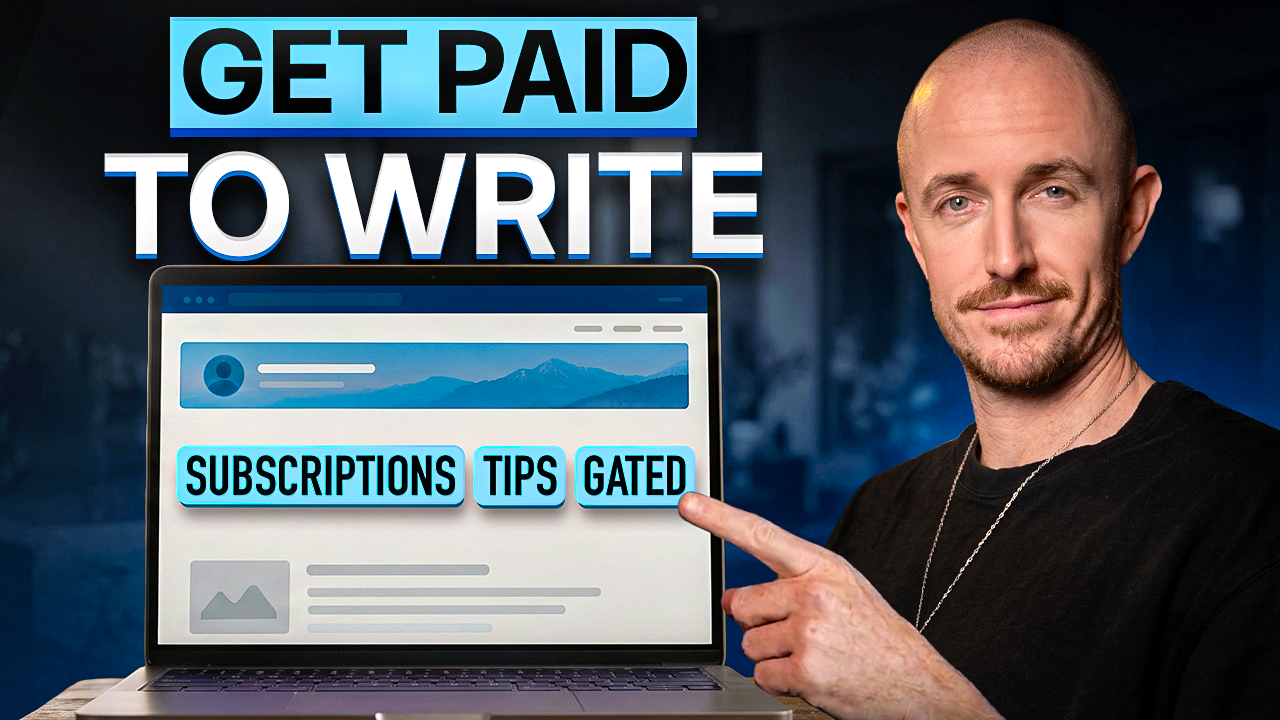
- Three built-in ways to earn. Paid monthly or yearly subscriptions, one-off tips, and gated premium posts.
- Jetpack handles the heavy lifting. It’s the official plugin from Automattic (the company behind WordPress.com), and it runs your monetization, newsletters, and social scheduling, with payments collected through Stripe.
- Keep most of your work free. Only gate the stuff that takes real effort.
- Start pricing low. A $1/month style offer converts better than a big price few people buy.
- One platform beats a pile of plugins. No duct-taping together a newsletter tool, a payments tool, and a memberships plugin.
Launch a Full Site in Minutes: WordPress
I’ve tried a lot of ways to get a site up fast, and this is the one I’d hand a non-technical friend without a second thought. You describe your business, it gives you a real first draft, and you take it from there. Free to try, no card needed!👇
Why Turning On the Money Layer Early is Key for Blog Monetization
I’ve been getting paid directly by my readers for years over on my main site, where I get around 150,000 readers a month. But that’s not where most people are today. So I did this whole setup on my new site, Creator to Company, where I’m teaching from my own playbook of growing a real business around content.
No audience yet. Literally week one. That’s the whole point, because most blog monetization advice assumes you’ve already built a niche audience, so it kicks in late.
When you turn the money layer on first, you’re ready the second readers show up. You’ve already figured out the mechanics of how you’ll monetize, so a viral post or a sudden traffic spike can convert immediately. Doing a little free keyword research up front helps make sure those readers actually arrive.
Experimenting early also makes monetization feel normal instead of intimidating. It’s just another thing you know how to do.
How To Monetize A Blog: Three Ways To Make Money Writing On One Platform
When people ask me how to monetize a blog, this is the simplest answer I can give them. Monetizing your writing comes in three flavors, all built right into WordPress.com. Together they give you multiple revenue streams, including a shot at passive income from subscriptions that renew without any extra work.
- Paid subscriptions, where readers pay monthly or yearly to support your work
- One-off tips, a tip jar for people who aren’t ready to commit
- Gated premium posts, individual pieces only paying members can read
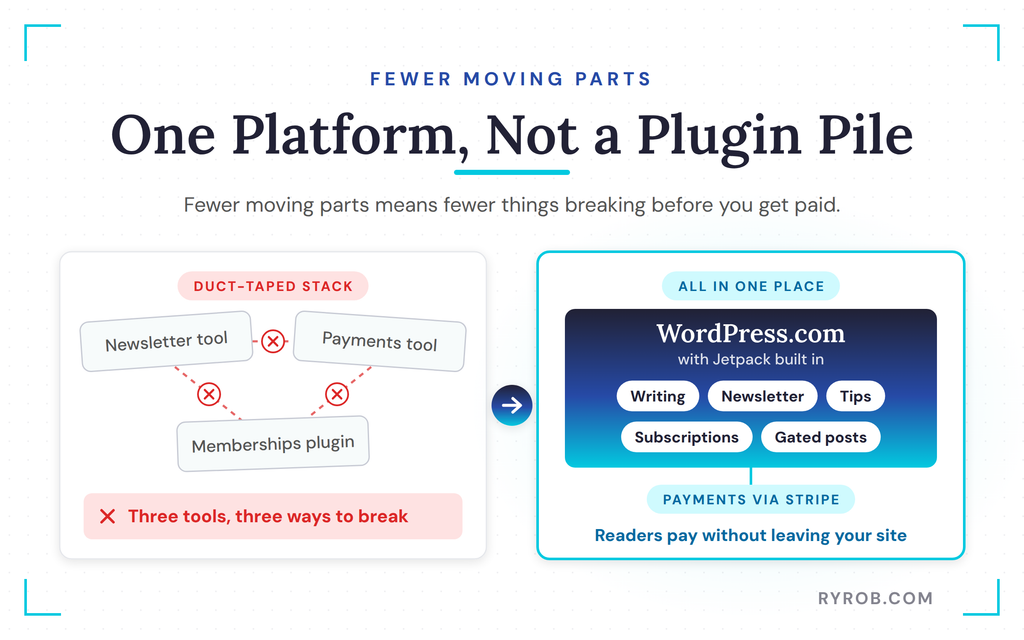
Here’s why having all three in one place matters. Normally, getting paid as a writer means bolting together a newsletter tool, a payments tool, and a memberships plugin, then hoping they all talk to each other.
On WordPress.com, the writing, the newsletter, the subscriptions, tips, and gated content all live where you’re already publishing. Fewer moving parts are fewer things that can break between you and getting paid, and you can try it all on WordPress.com without stitching anything together.
How to Set Up Paid Subscriptions on WordPress.com
This is the big one. I turned on a paid tier so readers can pay monthly or yearly to support my work and get all of my best educational content behind a paywall.
Everything happens inside Jetpack, your home base for monetization, newsletter management, social scheduling, backups, forms, and more. Start by hitting the monetization menu option and connecting your Stripe account to collect payments.
Connect Stripe and Price Your Paid Tier
Once Stripe is connected, you’re ready to set up your first offer. I named mine monthly paid newsletter subscription, toggled on the paid newsletter tier, and wrote a description so people know what to expect. Make this part sound compelling, because it’s what subscribers see before they pay.
Then set your price. I charged just $1 a month for this premium tier because it’s a gateway product into eventually selling online courses and other digital products. For the annual price, I set $5 so it seems like a no-brainer option.
I customized the welcome message, and that was it.
Add the Subscribe Block With the AI Builder
Next, you need to make that plan purchasable on your site. I edited my premium page using WordPress.com’s AI agent, which is one of my favorite ways to add new sections to a page.
I selected the area where I wanted the block, sent a simple prompt asking for a paid newsletter subscription section, answered a couple of quick questions, and the call to action appeared.
No code, no custom blocks, no theme settings. The block itself is the paid content block, and it automatically links the subscribe button to my paid newsletter plan out of the box.
Checkout is super easy. Readers pay with credit card or bank transfer, hit pay now, and they’re on your list. Your first subscriber… that easy.
Here’s what makes this so useful. Your readers never get redirected to some other site. They’re reading, they hit the button, they pay, then they’re back to reading your premium content.
Once those subscribers are in, they’re primed to buy bigger things from you, like digital products or an online course when you launch one. That smoothness removes the old hassle of setting up monetization in the first place.
If you want to follow along, you can set up paid subscriptions on your own WordPress.com site in a few minutes.
How to Add a Tip Jar for One-Off Support
Not everyone is ready for a recurring subscription, but plenty of people will happily drop you a few bucks if you make it easy. Think of it as a tip jar for your writing.
Back in Jetpack’s monetization area, I went to payment settings and added a new payment plan called Ryan’s tip jar. I set the renewal frequency to a one-time sale, made the suggested amount $5, and customized the welcome message.
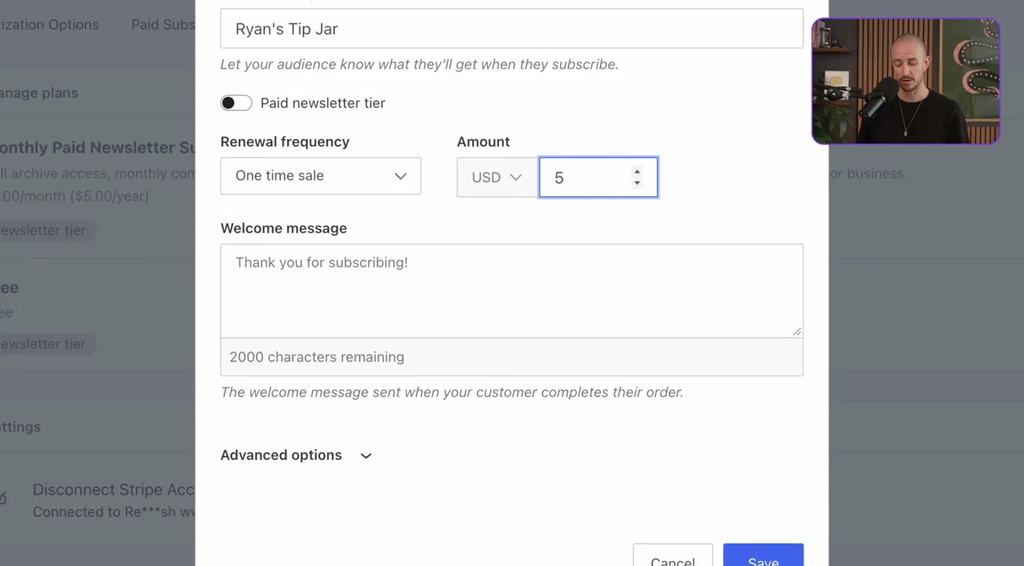
Under the advanced options, I enabled pay-what-you-want, added every donor to my email list, and turned on repeat purchases so people can tip more than once. That last part matters more than it looks.
Every tipper is a warm lead who liked your writing enough to pay for it once, so adding them to your list lets you grow your newsletter on autopilot and build a real relationship with readers in your niche.
Placement matters here too. If you have too many paid offers on one page, people get turned off or freeze up entirely. So I put the tips block down toward the bottom, right where people are about to leave.
To add it, I typed the slash command and searched tips, which brought up the tips block. The default text says buy me a coffee, but you can customize that however you want. I used the AI agent to add a header and subheading, and within a few seconds the whole block was dialed in, in my voice and style.
Don’t sleep on donations. Tips are the lowest commitment way for a reader to say I value your content, and they add up more than you’d think, especially if your writing is hitting with people. Plus, they’re a great low-price way to get people in the door, and once they’re deeper into your content they’re much more likely to purchase more from you.
How to Gate Premium Posts Behind a Paywall
Gated posts are different from a paid newsletter. This is for individual pieces of content you want to lock, like a super in-depth guide or a long tutorial with video instruction embedded. These locked posts are also a simple way to sell digital products, such as a specialized guide for readers deep in your niche, or even a mini course.
First, create the product. In Jetpack’s payment settings, I added a new payment plan called gated post $1. One-time sale, dollar price.
Under advanced options, I toggled on the option to add buyers to my newsletter, and enabled repeat purchases in case someone wants to buy more of these digital products later. Then save.
Next, gate the post itself. Open the article you want to lock and add the paid content block right below the introduction. Select the tab inside the block and drop down to the gated post option, which makes it a $1 purchase. (You can even set up a new custom subscription right there if you want this post priced differently.)
Then add a paywall block beneath it. Everything below that line gets hidden from anyone who hasn’t paid, and returning paid subscribers can log in to read.
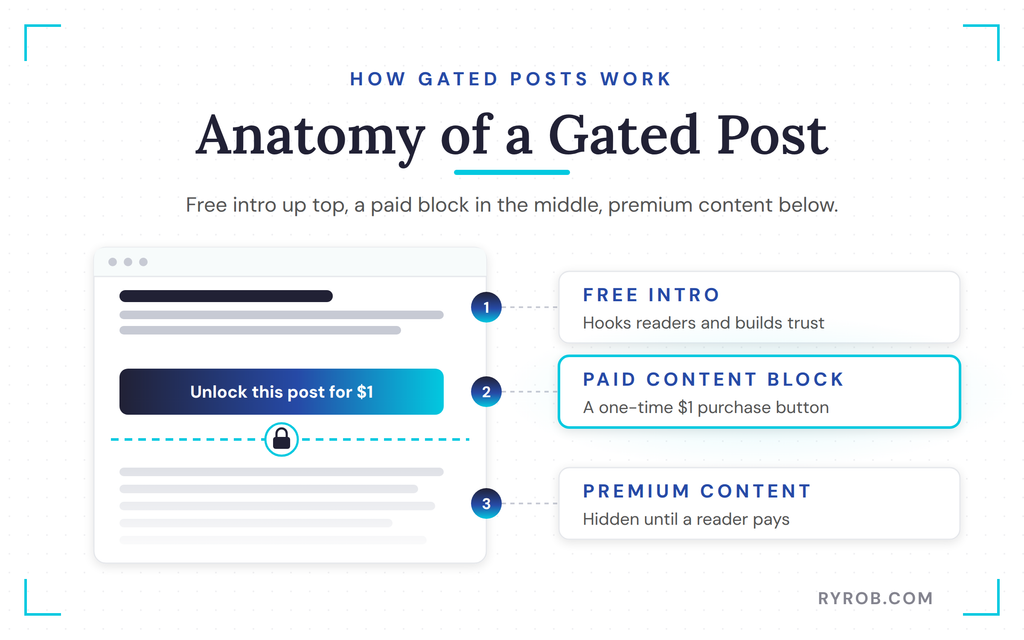
The Paid Content block from Jetpack handles one-time, monthly, and annual payments, so you’re covered no matter which structure you pick. That flexibility matters once you start selling more than one niche product, since a $1 guide and a $49 course need different payment setups.
I teamed up with WordPress.com on this walkthrough because it’s genuinely the setup I’d point a new writer to, and if you want to follow along on your own site, you can get started for free on WordPress.com in a few minutes.
What to Gate and How to Price Your Paid Content
The question everybody gets wrong here is what to gate. So here’s how I think about free versus paid content, straight from honest notes on doing this on my own site for years.
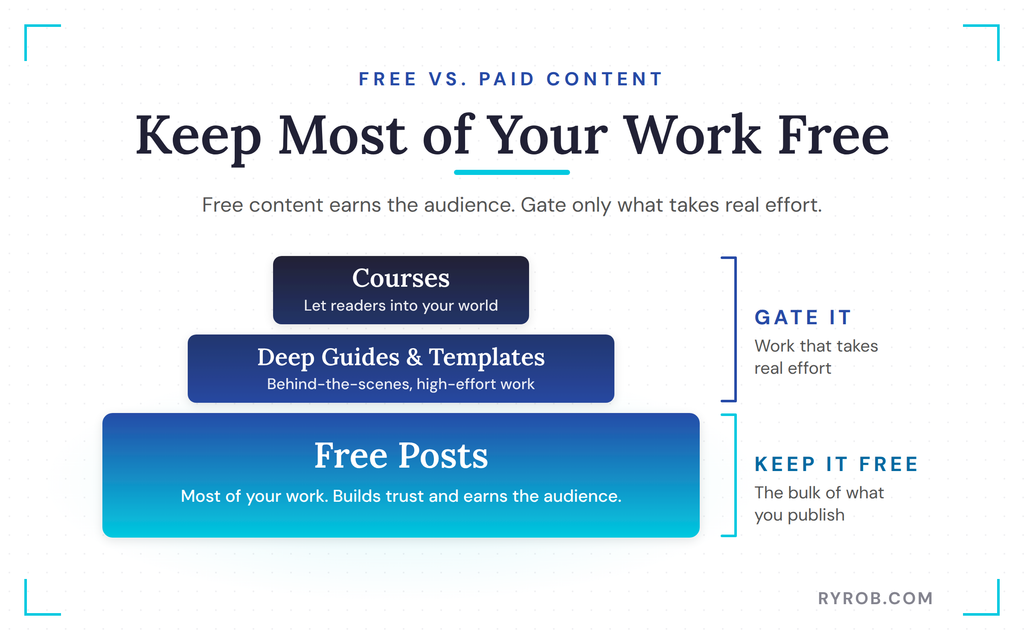
Keep most of your work free. The free stuff is what earns you the audience in the first place, and it builds a lot of trust with people. Gate the things that take real effort, like the deep guides, the templates, the behind-the-scenes stuff, and courses that let people into your world.
Paid subscriptions work well alongside other blog monetization methods, and most writers still read blogs and pay for good writing, so people really do still read blogs in big numbers. A few income streams worth layering in once you have traffic.
- Display ads through networks like Google AdSense earn money from page views, though the rates stay small until your blog traffic grows.
- Affiliate marketing, where you join a program like Amazon Associates, add affiliate links to relevant posts, and earn a commission on each sale. Just include an affiliate disclosure so readers know you get paid.
- Sponsored posts and brand partnerships, which can pay well, but they only make sense once your monthly traffic justifies a brand’s budget.
On pricing, don’t overthink it. A small monthly number that a few percentage of your readers happily pay usually beats a big number that rarely gets purchased. My advice is to start lower than feels right, and you can always raise it later.
Once the paid membership is running, you can layer in other income sources. Ebooks, coaching services, and consulting services all sell naturally to the same audience, and digital products turn into passive income over time.
For the bigger picture, my guide to proven blog monetization methods covers a dozen other income streams on top of these.
Where the Built-In Tools Stop (the Honest Limits)
The built-in tools are great for most writers getting started and scaling up. But if you grow into needing really advanced membership tiers or deeper community features, you might eventually reach for an add-on. That’s a good thing, and it’s how most of these setups evolve. For the vast majority of writers, what’s built-in is more than enough to start charging today.
One reality check while you’re at this. Blogging isn’t a fast-cash option. Bloggers make about $53,025 per year on average by Indeed’s salary data for bloggers, though that varies a lot by experience, audience size, traffic, and niche. Monetization takes time to put in place, so pair this setup with realistic patience.
FAQs About Making Money Writing
Here are the questions I get asked most about making money writing.
Can you monetize a blog with no readers?
Yes. I did this whole setup on a site in week one with no audience. Turning the money layer on first means you’ve already figured out the mechanics, so you’re ready the moment readers show up.
How much should you charge for a paid newsletter when starting out?
Start lower than feels right. I set my premium newsletter tier at $1 a month with a $5 annual discount. You can always raise prices later, and a small price that converts beats a big price that doesn’t.
What’s the difference between a paid subscription and a gated post?
A subscription is recurring monthly or yearly support that unlocks your paywalled content. A gated post is a one-time purchase for a single article, which works well for in-depth guides, video walkthroughs, or a simple course setup.
Do tips and donations actually work for bloggers?
They add up more than you’d think, especially if your writing is hitting with people. Tips are the lowest commitment way for a reader to say they value your content, and they’re a great entry point before bigger purchases.
What do you need to collect payments from readers?
A Stripe account connected inside Jetpack handles all the payments, whether it’s a subscription, a tip, or a gated post purchase.
Final Thoughts on Making Money Writing
That’s the whole money layer, which is subscriptions, tips, and gated posts, all in one place with no extra tools bolted on. I set this up on a site with zero readers on purpose, and the process is identical whether you’ve got an audience or you’re starting from scratch. It’s also the first step in any blog monetization plan, because a payment system with no readers costs you nothing but an hour of setup.
The mindset is simple. You open the door first, so the day someone wants to support your writing, there’s nothing standing in the way. Set up your first payment plan today, learn to grow your audience, and you’ll be ready the second the readers arrive.
Launch a Full Site in Minutes: WordPress
I’ve tried a lot of ways to get a site up fast, and this is the one I’d hand a non-technical friend without a second thought. You describe your business, it gives you a real first draft, and you take it from there. Free to try, no card needed!👇
Disclaimer: This story is auto-aggregated by a computer program and has not been created or edited by budgetbuddy.
Publisher: Source link
Publisher: Source link