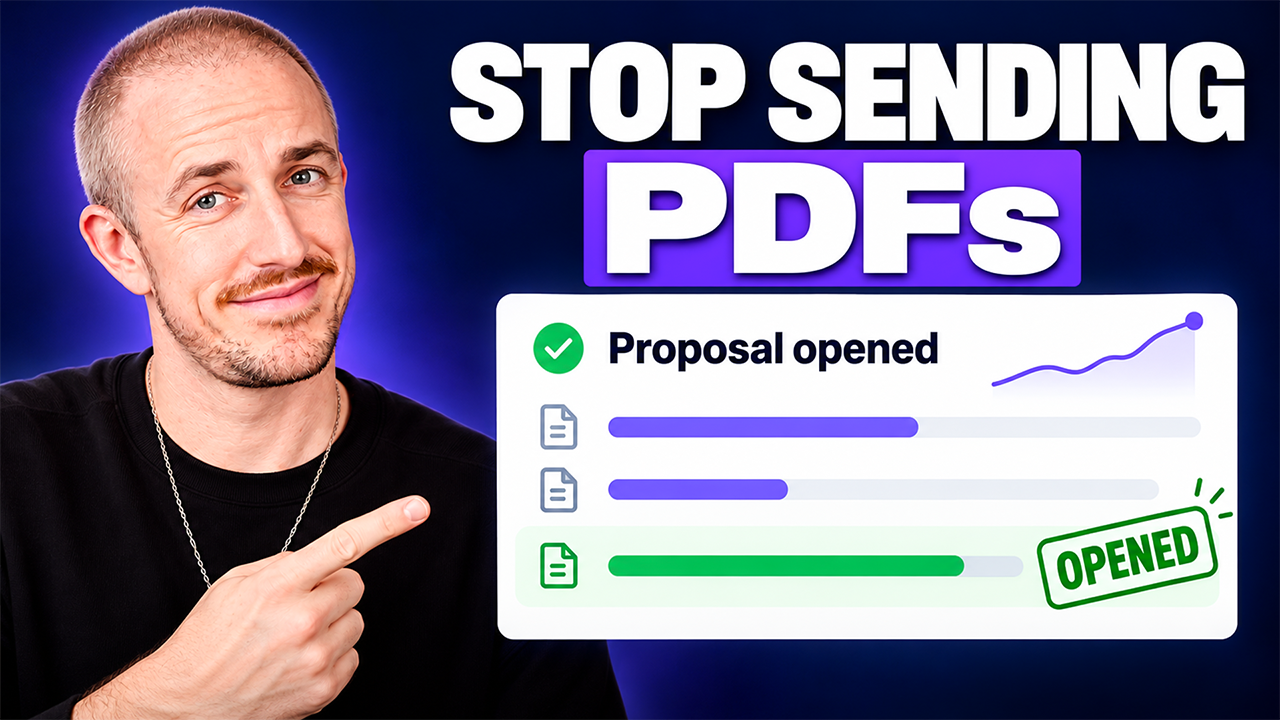
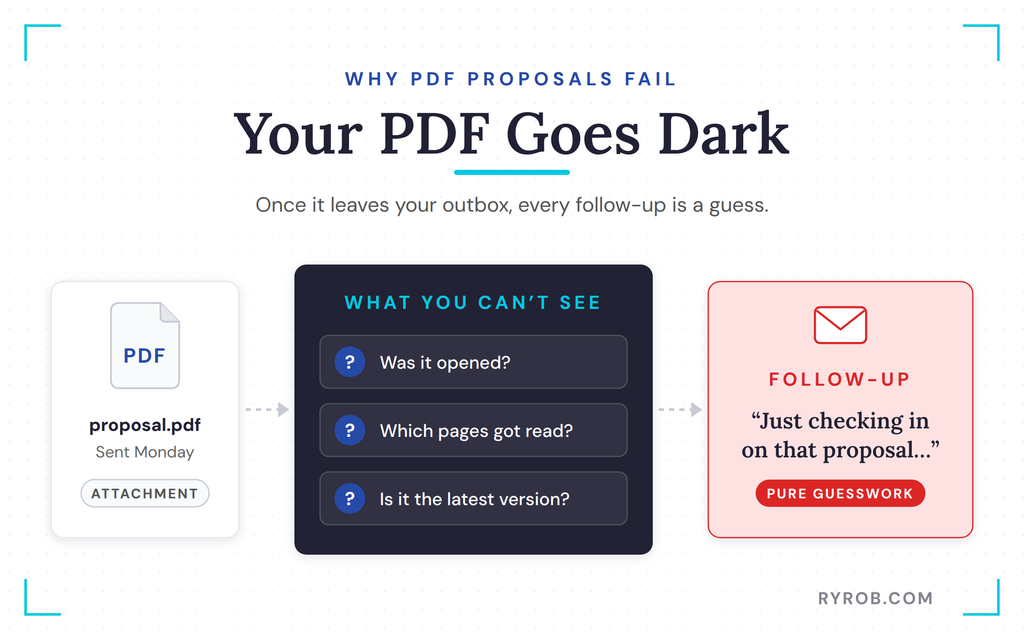
You spent a week on a proposal, hit send, and then… nothing. Three days of silence, and you have no clue whether they opened it, skimmed your pricing and bailed, or buried it under a pile of other emails. The real problem is that a PDF attachment has no document tracking built in, so the second it leaves your outbox, it goes dark.
That means every follow-up is a guess. You end up firing off another “just checking in” email and hoping something sticks.
So I took the real proposal my agency sends to potential clients and rebuilt it into a digital flipbook to report back. Now it tells me when it gets opened, what got read, and what to say next to move the deal forward. Here’s the full video walkthrough I recorded while rebuilding the whole thing from scratch.
Key Takeaways on Document Tracking Proposals
- A PDF attachment gives you zero visibility. You can’t tell if it was opened, which pages got read, or whether your prospect is even looking at the latest version.
- A digital flipbook lives at a link, not in an attachment. That’s what makes document tracking possible, so you can see when it’s opened, which pages get the most attention, and when it’s downloaded.
- A separate trackable link for each prospect keeps your data clean. You also get email notifications for opens, downloads, and proposals that never get opened at all.
- Interactive elements do the selling for you. Video embeds, clickable case studies, and a book-a-call button make the proposal worth reading and cut down the email back-and-forth.
- You can swap the PDF inside an existing flipbook. Updated pricing or terms show up on the same link your prospect already has, with no resending.
- Tracking tells you what someone did, not why. It makes your follow-up smarter, but it never replaces an actual conversation.
Track Every Proposal You Send With FlippingBook
FlippingBook is the tool I used to rebuild my agency’s proposal into a trackable link. What sold me is that the open and page-level tracking comes on every plan, even the cheapest one. You can test it on your next proposal without paying anything up front!
Why PDF Proposals Leave You Following Up Blind
I want to be fair to the PDF, because PDFs are great at plenty of things. They look the same on every device, and pretty much every prospect on Earth can open one.
The problem is what happens after you send one.
The moment a regular PDF attachment lands in someone’s inbox, you have no way of knowing anything about it. Did they open it? Which pages got read, and are they even looking at the current version or one from two revisions ago?
None of that information exists. So if your sales team runs on PDF attachments, they’re following up blind.
And “just checking in” is exactly what that kind of follow-up sounds like. Nobody likes getting that email, and nobody likes sending it either.
Plenty of proposals also stumble before they’re even sent, which is why I covered the most common proposal mistakes separately.
The Proposal Used in This Walkthrough
Here’s the proposal we send to brands for sponsoring content across our publishing platforms. It’s our flagship package, pitched to Shopify as the running example.
It’s a pretty normal PDF with placeholders for client-specific assets and a few numbers we tweak based on who we’re pitching. If you want the fundamentals, I covered how to write a proposal separately.
One quick disclosure before we dig in. This walkthrough uses FlippingBook, the sponsor of the original video, which converts PDFs into digital flipbooks you can share as trackable links.
I ran it on a real agency proposal so you can see exactly how it holds up in an actual sales process. If you want to set this up alongside the walkthrough, you can try FlippingBook for free, and it costs you nothing extra.
Turn a Proposal Into a Document Tracking Link
I set up the tracking first, before any of the pretty stuff, because it’s the part I value most in a tool like this.
Transform a PDF Into an Interactive Sales Proposal
I start by dragging the proposal PDF into FlippingBook. In less than a minute, it’s now an interactive flipbook instead of a static file. All the same pages, all the important details, but it lives at a link instead of inside an attachment.
This is where the proposal tracking kicks in, since everything the prospect does with that flipbook gets logged.
Create a Separate Link for Each Prospect
This is the feature I like most. Instead of one link for everybody you pitch, you create a separate trackable link for each prospect, and I named mine for the prospect over at Shopify.
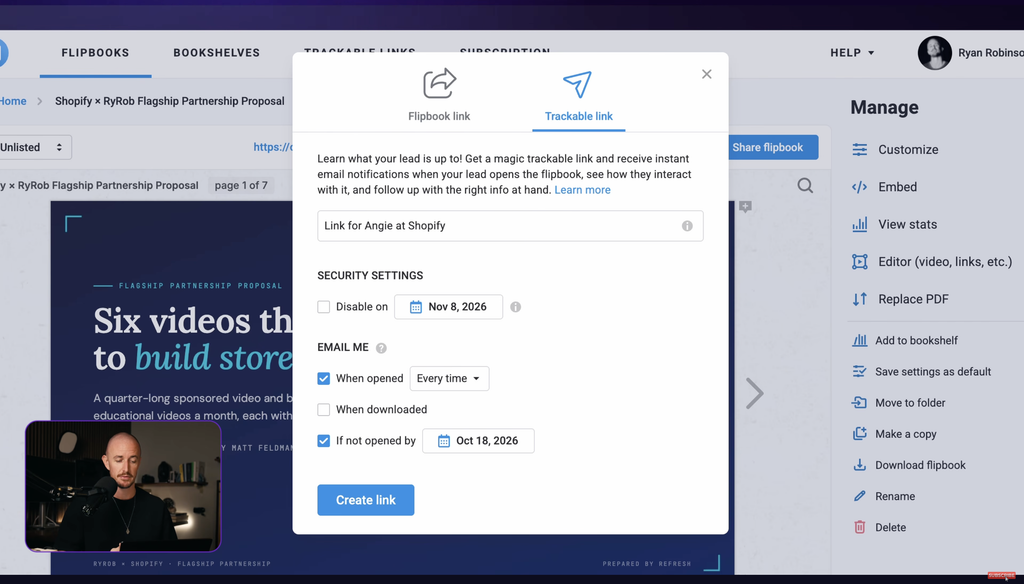
The options here matter. I turned on email notifications for when the proposal gets opened and when it gets downloaded or printed, and I set it up so I get an email if nobody opens it over the next week.
Since this proposal has a real offer inside it, I also set the link to expire on a certain date.
Choose How the Proposal Can Be Viewed
You can set how the flipbook displays. Public means anyone who finds it can view it, and unlisted means only people with the link can see it, which is the setting I use.
There are more private options if you need them. There’s also an optional lead capture form, so you can collect a name, email, and phone number before someone views your flipbook.
I left that off for this one, since I’m already in conversation with this prospect.
Send the Link and Check Engagement
The trackable link copies and sends just like any other link, straight from Gmail, with no attachments required. When the prospect clicks through, they can read the proposal on a computer or a phone, and they can still download the PDF to share with their team.
The difference on your end is immediate. The second I opened it as the test prospect, an email notification landed telling me it was opened and when, and I even got notified on repeat opens and on the download.
Here’s the honest comparison of what you actually learn.
- A regular PDF tells you nothing. No opens, no page views, no downloads, nothing.
- A trackable link tells you when it was opened, how many times, how long they stayed, which pages got the most time, and when they downloaded it.
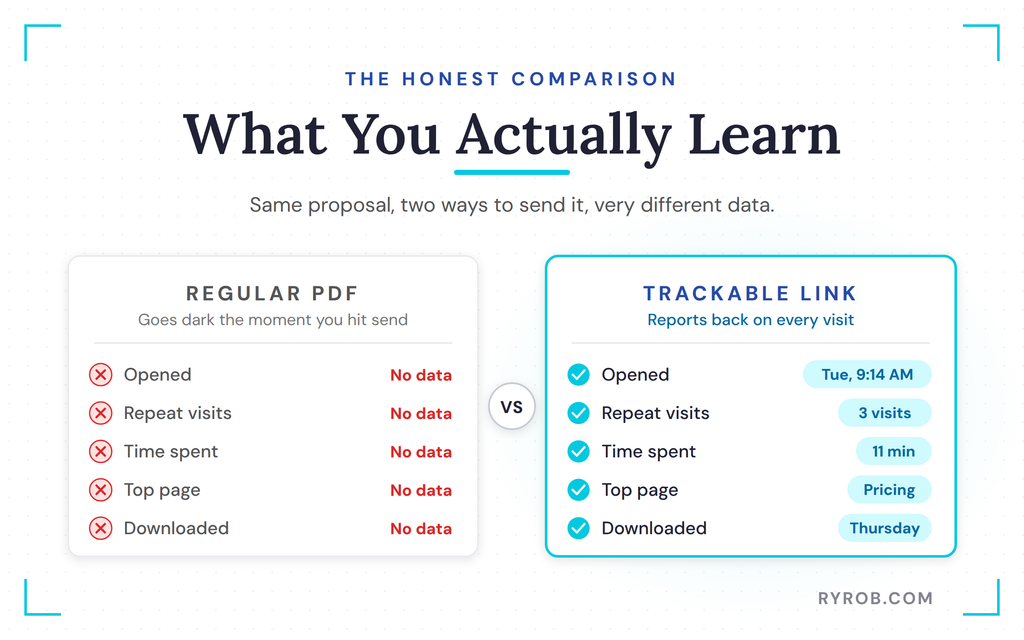
That activity data is huge from a sales perspective, because it shows you how engaged the prospect really is.
Make the Proposal Worth Reading
Tracking tells you what happened after the send. This next part is about making the proposal itself land, and it’s what keeps your brand from drifting.
Keep the Design Consistent
The second your team starts customizing and sending decks around, the brand starts slipping. FlippingBook’s branding options fix that.
I added our logo and set a custom background so every version goes out looking the same. Marketing can keep the approved versions in shared folders, so sales isn’t digging through a downloads folder for the right file every time.
The logo links straight to our website, and I kept the background light. A quick preview confirmed it all looked right before anything went out.
Add Video and Links to Relevant Work
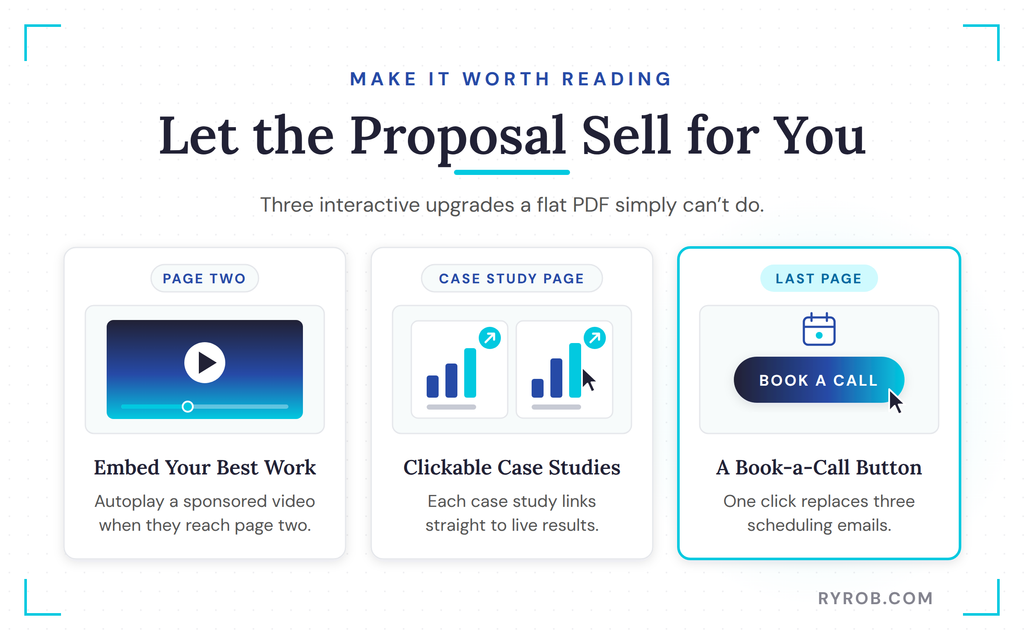
Now I made the deck interactive, which is something you simply cannot do with a flat PDF. On page two, I dropped in one of my past sponsored videos so the prospect can see the work instead of taking my word for it.
I grabbed the link to a video most relevant to what Shopify would care about, pasted it in, and FlippingBook pulled it into a clean container that I dragged right over the placeholder. There are settings to control when the video starts, including autoplay when someone hits page two, which I think is genuinely cool.
On the case study page, I linked straight out to live results for past clients, so a click takes the prospect directly to where each case study lives on my site. FlippingBook also spotted a URL in the deck that wasn’t hyperlinked and offered to link it, which I accepted.
There’s plenty more you can add here too, like audio, animated GIFs, image galleries, inline and pop-up images, even quizzes. Every one of those choices makes the proposal a better read for the prospect.
Make the Next Step Easy
On the last page, I added a clickable button to book a call. When the prospect is ready, the next step is one click instead of three email exchanges just to find a time, the same back-and-forth a sharp cold email helps you skip at the start. I grabbed my Calendly link and dropped it in as the button’s destination.
If you publish something like this publicly, say a services guide on your website, you can skip the paper forms and add a lead form right inside the deck. It supports web-based forms from Typeform, Microsoft Forms, and Google Forms.
Drop the link in, confirm it, and FlippingBook creates a call to action button where you control the look and feel.
Put the Whole Sales Kit in One Link
Here’s what a typical sales email used to look like for us, with the proposal, usually a couple of case studies, and our media kit. The prospect has to download all of it and juggle it somehow.
With a digital bookshelf, I put all of our proposals on one branded page, in the order I want them read, and I can send one shareable link. Everything lives in one place and the whole team pulls from the same files. That’s also where I upload all of our interactive case studies.
One quick note on how this fits together. Individual trackable links are available for flipbooks, not for bookshelves, so the proposal still goes out as its own trackable link and the bookshelf is where everything else lives.
I teamed up with FlippingBook on this walkthrough, so if you want to build your own trackable proposal while this is fresh, you can start a free FlippingBook trial and test it on your next deal.
Read the Data and Follow Up Smarter
This is the part that changes how a sales team follows up.
Review What the Prospect Did
Remember, I was browsing like a prospect who’s curious but cautious about price. The report for that tracking link shows how many pages were viewed, which pages got clicked, plus the total time spent and when the last activity happened.
The data told me my prospect went to my site, looked at my case studies, and clicked into booking a call, but that booking never came through on my end. Something hasn’t been decided yet.
They also spent a lot of time on the pricing page, which is worth knowing before I follow up.
Read the Signals Without Guessing Too Much
Here are the rules I use for reading these analytics.
- If someone lingers on pricing, the follow-up is about value and options, not more features.
- If they spent time on the introduction and clicked the case study links, they want more proof, so I’d send another case study that looks even more like their business.
- If they opened it once and never came back, it’s probably not the right timing, and I’d rather know that.
- If they downloaded it, there’s a good chance it’s being passed around internally, so I’ll offer to make that easier.
Write a Follow-Up That Matches the Prospect’s Activity
Here’s the follow-up email I’d send that prospect based on what the report shows. Notice it doesn’t say “just checking in” anywhere, because it picks up right where they left off inside the flipbook.
That’s the whole game with follow-up emails, anticipating objections and meeting them before they’re raised. The page-level data tells you what’s on a prospect’s mind before you type a single word.
Update Pricing or Terms Without Sending a New Link
This one sounds like a terrible idea at first, but it isn’t.
Replace the PDF Inside the Existing Flipbook
Say your pricing changes, or the terms of the deal need an adjustment, or you spot a typo on page three after it’s already gone out. With a PDF, you have to send a brand new file.
Now your prospect has “proposal final” and “proposal final V2” sitting in their inbox, and you’re hoping they open the right one.
For a team that updates pricing or terms regularly, that’s how last quarter’s numbers end up in front of a prospect by accident. Then you’re almost guaranteed to be negotiating against yourself on price.
In our example deal, I spotted a missed opportunity to pitch Shopify on booking their full year of content partnerships all at once, at a discounted rate. So I wanted that added to the deck before the prospect dove in.
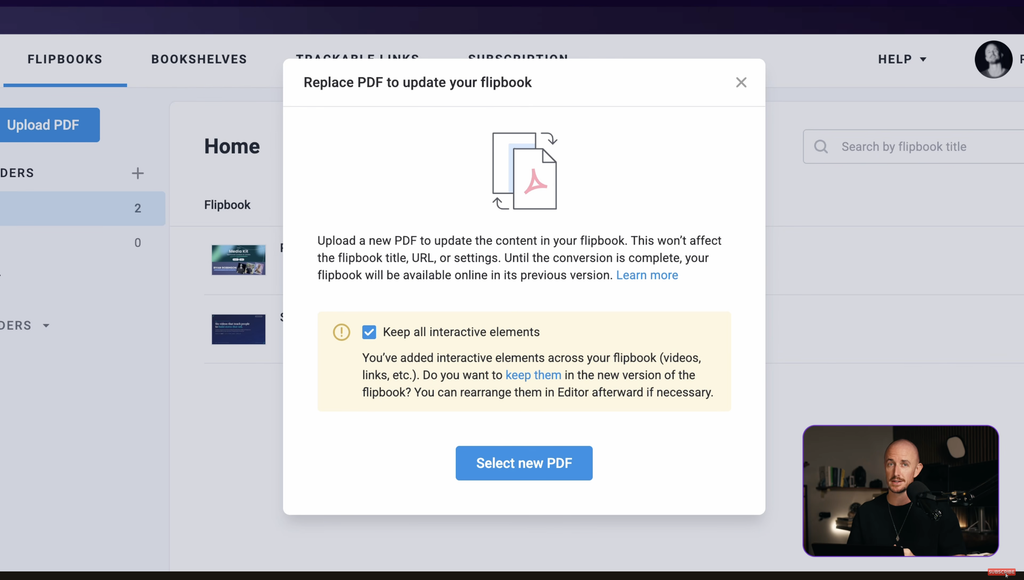
If you build your proposals as template-based documents, this kind of swap is a one-step job. With FlippingBook, I uploaded the updated version to the same flipbook, and the link didn’t change at all. Here’s how it went.
- Open the more options menu inside the flipbook and hit replace PDF.
- Keep your interactive elements when FlippingBook asks, so the video embed and clickable links carry over. Of course yes. Who likes duplicating work?
- Select the new PDF, and the updated deck lives right there on the same link.
It all happens behind the scenes, since FlippingBook swaps the old file for the new one while keeping the same link and all the interactivity.
Then I refreshed to check, and everything held up.
- The autoplay video is still in place.
- All my links are intact.
- The new page with the full-year discount is right where it should be.
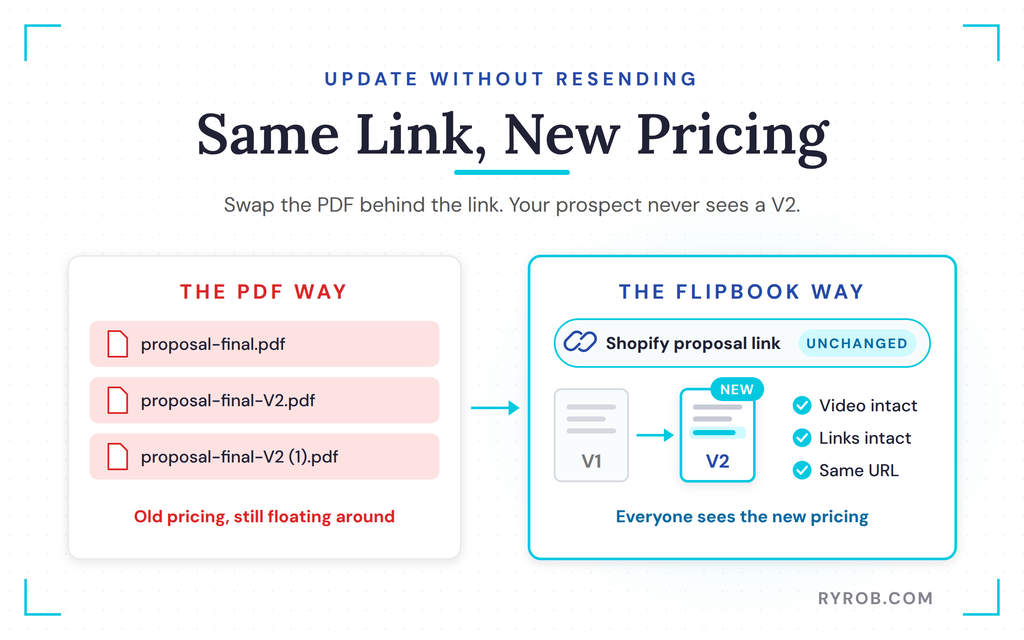
Everyone on the prospect’s team is now looking at the same link with updated pricing.
Turn Off a Link When an Offer Expires
If a deal goes cold or an offer expires, I can switch that link off. The tracking stats all stay, but the link stops working, which keeps expired offers from floating around long after they’re dead.
Consider the Tool’s Limits and Plan Options
A few honest limits before you set this up on your own proposals.
Know Which Features Sit on Higher Plans
Trackable links are on every plan, including the cheapest one. Branding, bookshelves, video embeds, and lead forms start on the Optimal plan.
A few things, like animated GIFs, API integrations, and password protection, are on the Advanced plan, which is the tier I used for this walkthrough. That kind of tiering is pretty standard for tools like this.
| Feature | Plan |
|---|---|
| Trackable links & document analytics | Every plan |
| Updating flipbooks | Starter |
| Branding, bookshelves, video embeds, lead forms | Optimal |
| Animated GIFs, API integrations, password protection | Advanced |
The good news is the feature I like most, link tracking, comes with every plan.
Treat Analytics as a Guide, Not a Substitute for Conversation
This is the one I keep coming back to. Document tracking makes your follow-up smarter because you know what your prospect actually looked at.
It doesn’t tell you what they were thinking, and it won’t close the deal for you. Use the data to guide the conversation, then have the conversation.
FAQs About Document Tracking for Sales Proposals
A few quick answers to the questions I get most about running document tracking on proposals.
Can a prospect tell that my proposal link is being tracked?
Nothing about the reading experience changes for them. They click a normal-looking link and read the flipbook on desktop or mobile, while the tracking happens on your side through notifications and the analytics report tied to that specific link.
What if I need to send the same proposal to several prospects?
Create a separate trackable link for each one. That’s what makes the data usable, because you can see each prospect’s activity on its own instead of blended together, and you can check on any link from the trackable links tab.
Can I still send a PDF when someone asks for one?
Yes. Downloads are supported, and you get an email notification when the proposal is downloaded. A download is also a signal worth reading, since it often means your proposal is being shared internally and you can offer to make that easier.
How is document tracking different from a read receipt?
A read receipt only confirms something was opened. Proposal tracking shows you much more, including which pages they spent time on, how long they stayed, how many times they returned, and whether they downloaded it. That page-level detail is what tells you how to follow up, not just that they clicked.
Is it legal to track when someone opens my proposal?
Yes. Tracking engagement on your own proposal that you send straight to a prospect is standard sales practice. The one thing to watch is collecting personal details, like through a lead capture form, since that’s where privacy rules apply, so check your local regulations if you go that route.
Final Thoughts on Document Tracking
The whole problem with a PDF proposal is that you send it and go blind. A trackable proposal fixes that, because it tells you when it’s opened, what got read, and what your prospect actually cares about, so your follow-up picks up where they left off instead of starting from “just checking in.”
If you want to test flipbook document tracking on your next proposal without paying anything up front, you can try FlippingBook for free. It costs you nothing extra, and it’s the same setup I just ran through a real sales process.
Track Every Proposal You Send With FlippingBook
FlippingBook is the tool I used to rebuild my agency’s proposal into a trackable link. What sold me is that the open and page-level tracking comes on every plan, even the cheapest one. You can test it on your next proposal without paying anything up front!
Disclaimer: This story is auto-aggregated by a computer program and has not been created or edited by budgetbuddy.
Publisher: Source link
Publisher: Source link